Tuesday, December 27, 2016

Regina King, Rules!

One of the highlights of this year's Emmy Awards Show was Regina King.  Yes, that was a fantastic red dress and her performance in American Crime that scored her win of Best Supporting Actress in a Limited Series or a Television Movie.  The reason Ms. Regina rules?  She had the best quote of the evening.  And that's saying a lot, since there were so many articulate performers and winners.....


Upon winning, she gave thanks to the crew, adding -  "Teamwork makes dream work"

Imagine if only we could get Congress to do the same.....

Friday, December 16, 2011

Hitchens Transcends Ultimate Fight

Blast! Why shed tears for passing of Christopher Hitchens. I say cheers. He was so provocative, captivating even to the end.  True, no one person could agree with all that he wrote; yet it was precisely his polemic challenges to the intellect that made his work magnificent must reads.  He turned his passions and curiosities into deeply penetrating prose, thought provoking pieces that leave us with a lot to contemplate. 

His work influenced many, including me. His personal essay on waterboarding pushes his own courage even as it butts against his conservative hawkishness. It is precisely this article published in Vanity Fair that compelled me to write in this blog about the matter and take it a step further [see in this blog on October 2008].

How fortunate we are to have his body of work that embraces American heroes, like Thomas Jefferson: Author of America, ironically from a Brit who became a US citizen. Yet for others in power he exposed close up of clay feet in excruciating clarity as in No One Left to Lie To: The Triangulations of William Jefferson Clinton.  He suffered absurd criticism in the NY Review of Books for taking a point of view that “politics is essentially a matter of character.”

Besides his substantial oeuvre, we are left with an overriding mystery. Of all of his principled beliefs, it's his atheism, or more precisely his demeaning put down of believers, that leaves us wondering. As we were drawn into his last battles of Stage 4 esophageal cancer, he is frank, exposing his vulnerabilities on a very personal level.  As he contemplates what must seem to be an abyss, he draws not so pretty pictures of the dilemmas he faces.  It is amazing to me that hat he was compelled to write even while under the ultimate deadline.  Instead of bitterness he speaks to dying as if he was covering an armed insurrection.  With the ultimate coup de grĂ¢ce his thoughts on death and dying also acknowledge prayer groups assembled on his behalf.  Could he at the end  have reversed his long standing rejection of a higher power of God?   Even in death he leaves us pondering what are essential truths.

Hitch, on the other side, now knows absolutely. I'm certain he would want to publish his observations in his vivid, over-the-top style.

So fondly it's time to give this man his due, an extraordinarily gifted writer with the email address "hitchbitch@vf.com."  For all he's left behind, his "voice" lives on as an inciting and exciting embrace of the English language, cherishing the belief to rise to the occasion of the noble fight, especially for our democratic ideals.

RIP: Christopher Hitchens, 1949–2011

Friday, December 9, 2011

Santa Comes Early for WebOS Fans

Leo Apotheker never got it.  Today, HP announces a big gift to developers, WebOS is going open source.  

Yes this is strategic since HP's bread and butter is with printers. Well what in the heck does that have to do with WebOS you ask?   WebOS is the e-ticket for HP [yeah, you might pick up on the double entendre].  It's the printers, silly.

HP is building an infrastructure on ePrint. Here's what was in an April 2011 HP white paper titled Mobile Printing Strategy:

"HP ePrint makes mobile printing easy for large enterprises, small businesses, on-the-go professionals and consumers. Now anyone with an email- and Internet-enabled device can print documents, photos, presentations, reports and more—from their enterprise company offices, hotels, airport lounges and print-and-copy retail stores."

Since HP has already built printers with pad devices, I expect WebOS connectivity is and will continue to be built into their printers. 

Better yet, from my standpoint, WebOS is arguably will be more secure, a factor that I expect will make HP eprint less vulnerable to hackers.  To illustrate my point, in case you missed this recent finding by Columbia University, it illustrates how printers could be affected. 

My recent reluctance to move to Android platform is in part based upon the security issues with apps being published but not vetted by a recognized authority.  

Thursday, August 18, 2011

Ouch, HP discontinues webOS devices TouchPad and webOS phones --

Sad and shocking news especially in light of my recent article, see March 2011 post.  Last week I was at the Sprint store to check if there was going to be a Pre 3 in US soon.  Ironically, I looked at the Android devices and settled on the Epic as an alternative.  

Yet I'm still in a jaw-dropped state of mind.  It reminds me of IBM's decision a couple of decades ago when OS2 went down even though it was much superior to Windows.  

If there's a take away -- the best software doesn't always win.  I wonder why....

Sunday, July 31, 2011

The Elegant Language of Con Artists

Received this morning... The opening of this letter is more seductive than any suitor I have ever had the pleasure of being on the receiving end of ardurous attention.

Enjoy the read!

V~


Kufo Associates & Chambers.
Solicitors & Advocates,
Accra - Ghana.

Dear Friend,

I crave your indulgence for the unsolicited nature of this letter, but it was borne out of desperation and current development. Please bear with me.My name is Barrister Gabriel Kufo, a legal practitioner and the personal Attorney to late Mr. Micheal Harris who died in Air France plane which disappeared over the Atlantic Ocean were Brazilians and French nationals, airline officials said died along With his wife Mrs. Anne Harris on the 31May 2009 Air France plane with other 447 passengers on board (May their soul rest in peace).I know that my client had no living kin but I went ahead and made several inquiries to their embassy to locate any of my clients extended relatives but this has proved unsuccessful.
You can confirm this from the website below which was published by BBC. http://news.bbc.co.uk/2/hi/americas/8077858.stm

I only did so to be double sure of this fact. I have contacted you to assist in repatriating the money and property left behind by my client before they get confiscated or declared unserviceable by the bank where these huge deposits were lodged, particularly in a SECURITY COMPANY HERE IN GHANA where the deceased had an account valued at about $25 Million Dollars, The bank has issued me a notice that in the event that no next of kin comes up for the claim, the account will be confiscated if not claimed and we have just about few months.

Since I have been unsuccessful in locating the relatives for over now I seek your consent to present you as the next of kin of the deceased so that the proceeds of this account valued at US$25 Million Dollars can be paid into your nominated bank account and then you and me can share the money in the mode. 60% shall be for me and 35% for you and 5% shall be map out for expanse that are being made within the transfer.

I have all necessary legal documents that can be used to back up any claim we may make. All I require is your honest co-operation to enable us see this deal through. I guarantee that this will be executed under a legitimate arrangement that will protect you from any breach of the law.

Please your telephone and fax number urgently needed for further discussion.
I look forward to your urgent response here is my private email address (barrgabriel.kufoesq101@msn.com)

Best regards,

Barrister Gabriel Kufo Esq.

Monday, March 28, 2011

WebOS Game Changer Preview: Touchpad on HP's eStation C510 Printer

Erica Ogg, a CNET News reporter bemoans WebOS's lack of developers, programmers in an opinion piece last week "Can HP Make Developers Care about WebOS?".  I would have agreed with her on Friday, but not today.  HP has figured out how to best Apple and RIM dominance in the handheld marketplace. 

This part may seem like a non-sequitur but soon the tie in will become apparent.  I've got a couple of  HP all-in-one units.  Even though both units function well as printers, now for a number of years, I'm contemplating purchasing a replacement.   Running on Vista is the problem as has  HP hasn't updated the drivers for scanning, so I can't get aspect  function at all.  If I want to move to Windows 7, it's a given, I've got to get a newer unit.  Over the weekend I wandered through one of those big box stores.  As I checked out printers, my synapse slammed shut; I 'got' it. 

Built into new printers were a few touch screens.  To my astonishment, one unit had a portable.   So I picked up this 7" color touchscreen from it's cradle in HP's eStation e-All-in-One Printer.  Nice, I can preview photos before spilling valuable ink.  What, whoa, it does more!  That's when it struck me, the device seems so WebOS.    

This Zeen, as it's called, is very much upwardly mobile, kinda heavenly.  It's a digital companion, capable of accessing the internet -- hello Picassa photo album.  It sports both a USB 2.0 port plus a SSD media card slot.  With 800MHz, 512MB of RAM, and 4GB of internal storage, it's good to hold an estimated 100 apps, with 35 pre-loaded including MapQuest, Facebooks, and a weather app too.   I like the built in docking station ready to recharge the unit.  All in all, it looked to me like an wannabe grown-up version of the soon to be released Touch Pad on WebOS. 

Here's why I see this as a convergence of technologies worthy of a big Wow!!!  

As a harbinger of disruptive change, this is pure cutting edge. Although this is built on Android, this unit has a similar feel of WebOS running my Palm Pre.  HP is clever in terms of manufacturing.  This seems to be a pilot release, before both Pre 3 and Touch Pad hits the streets.  
 
Clearly this is a physical manifest of HP's magnificent business plan already in play.  Apparently HP has figured out their unique position and intends to use their printers as leverage to conquer  the handheld wars via WebOS integrations.  It's got more linkage that surpasses Apple's proprietary system.  HP's move into smartphone and tablet dominance via integration is clear.  Here's my list of how HP has already proven the Zeen is their bleeding edge:

1.  Like cell phones, pads are deeply personal units.  Since this Zeen unit is comes with the printer, it moves into your home easily.  Because this printer is aimed at households and personal usage; it's clearly designed as a product placement in order to break open a larger market for pads.
2.  Deep market penetration is planned.  Our constant need for a new printers given the aforementioned need to get full function drivers -- the Zeen does networks, wireless and Windows 7 - 64bit too.
3.  Low cost, Zeen doesn't seem to add to the cost of the printer. It's a spectacular value for what you get. Meanwhile an iPad sets you back $500.
4.  As an adjunct to the printer, it's got function that the iPad never contemplated including cross platform print functions with iPhones and iPads.  Otherwise, Mac users must seek out a Mac network or OS to print.  This is at the heart of HP's challenge to the underbelly of Mac iPad.
5.  Although print via wireless or via network are taken for granted, e-print is itself a multi-functional solution -- e-mail your photos and print from anywhere. 
6.  Entertainment options open up on the Zeen.  Play music, movies, and use virtually every file type from the SD card. 


7.  Read your morning newspapers or magazines and books from the Barnes & Noble app built-in.


Do I really need a new all in one device?  Humm, or am I just eager to scope out the Zeen.


Did I mention I really like the price -- Amazon lists: HP Photosmart eStation All-in-One (CQ140A#B1H) Buy new: $488.00 $269.99


One thing is for sure, after reading the reviews, this device seems to be on the bleeding edge which in a technical sense may be interchangeable with the term with 'beta'.

Sunday, March 27, 2011

QuickBooks 2011 Release R6 on March 21st, 2011 - many new features = bug fixes

Here's what we have in terms of fixes and improvements in the R6 release of QuickBooks 2011, Pro, Premier, and Enterprise versions. 

In terms of security, admin password reset option has been strengthened, a significant improvement, so make sure you keep your QuickBooks application up to date, use the latest version and release. 


Collections

Center

  • QuickBooks will now allow users to delete a Customer Note before sending emails from the Collections Center.

Form
Templates

  • Importing and customizing sales form templates will no longer cause the
    unrecoverable error 14867 99905.

Help

  • Send troubleshooting information to your support agent
    • Sends data from QuickBooks in-product browser and makes the data immediately available to agents.
    • Data sent includes OS, disk space, options in use, size of tables and more.
  • Integrated Help
    (available in Pro+, Premier+ & Premier PAP)
    • A search box and button have been added to the QuickBooks menu bar to allow quick access to online help.
    • A single search now queries the QuickBooks in-product help, the Intuit Communities and the QuickBooks support website for answers.
  • Built in
    Password Reset
    • QuickBooks can now reset your company file admin password from within the program.
    • Correct registration and license information is required to complete the process (to verify your identity).
  • Enhanced the way Help displays when changing the default Windows 7 font to a larger font.
  • Enhanced display issues when loading graphics in Help.
  • QuickBooks
    Automatic Data Recovery
    (not available for Premier Accountant and Enterprise Solutions at this time)
    • QuickBooks Pro, Pro +, Premier and Premier + now automatically create a copy of the data file. This can be used to do automatic data recovery should the file become damaged.

Intuit
Data Protect

  • The Intuit Data Protect System Tray icon will no longer load for
    unsubscribed users.

Intuit
Payment Network

  • Batch invoices will now have a selection to add the Intuit Payment Network link to them.
  • QuickBooks will no longer become temporarily unresponsive when selecting Allow Online Payment and Send Invoice Via Email while creating an invoice.

Inventory

  • The build point of an Assembly Item will now reflect properly on the items Reorder point.
  • QuickBooks will now display the "You don't have enough quantity to sell" message when appropriate while generating an Invoice from an Estimate or Sales order.
  • Added the ability to remove line items from Inventory Adjustments after the document has been saved.

Invoices

  • Batch Invoicing for Time and Expenses (Available in Premier+ and Premier Accountant PAP.)
    • Users can view billable transactions for multiple customers and view the billable amounts for time, expenses, mileage, and purchased items.
    • Select the customers to be invoiced, generate invoices, and select delivery options (email or printed).

Memorized

Transactions

  • Memorized Transactions Improvements (Available
    in Pro+, Premier+ and Premier Accountant PAP.)
    • The prompt to enter memorized transactions when opening QuickBooks has been replaced with a list of memorized transactions ready to be entered.
    • You can now choose "Do not display in the future" when prompted to enter a memorized transaction.

Payroll

  • The Print checks window now correctly show payroll checks in the print
    queue.
  • QuickBooks should no longer incorrectly display Error PS036 when you try to validate your payroll subscription.

PDF

  • The XPS Document Driver will now install properly if .Net is already installed
    on the computer.

QuickBooks

Connected Services

  • Intuit Data Sync (Sync Manager) will no longer fail to connect to company
    files that have special characters in the Company Name inside
    QuickBooks.
  • Launchpad Improvements (Available in Pro, Premier, Premier Accountant, Pro+ and Premier+.)
    • The launchpad feature can now be updated without a QuickBooks release patch.
    • Launchpad can track unique users within QuickBooks Desktop based on the company file name.
    • QuickBooks can now detect new Connected Services Applications that have not been setup yet and prompt the user to set them up.
"

QuickBooks

File Manager

  • You will no longer see the "Files Assignment May Change" dialog when you remove your client list and then update it.

Reminders

  • Inventory Items without a description will no longer display the description of the item above in the Inventory to Reorder section.

Reports

  • The transaction journal report now displays the Debit and Credit columns
    automatically in more cases.
  • When you combine multiple Profit and Loss reports, inactive accounts will no longer appear on the report.
  • Custom field views for MLI will now be available in OBDC reports.
  • Multi Location Inventory (MLI) views are now available when creating reports using ODBC.
  • New columns have been added for ODBC reporting.

SDK

  • Unit of Measure will now correctly import when there are more than 2 digits to the right of the decimal point in the conversion ratio.

User
Interface

  • The transaction journal report now displays the Debit and Credit columns
    automatically in more cases.
  • New tab on Transaction pane for information specific to the current transaction (Available in Pro+, Premier+ and Premier Accountant PAP.)
    • See who created and edited a transaction
    • When it was emailed
    • What transactions were related to it
    • New ability to create notes on supported transactions

Tuesday, December 21, 2010

Whew! QuickBooks R4 Concern Fix

QuickBooks 2011 IS good to upgrade to R4.  Even if verification halts and backup fails it does not indicate damaged data.

Intuit has documented a fix in KB article 899405 in case you encounter the verification problem.     If editing the QBW.INI file is not in your tool set, call on a ProAdvisor skilled in technical areas of QuickBooks to get it running right.


Intuit has confirmed that editing this script to turn off the flag does not disable necessary function.

So, it looks like the coast is clear, Whew!

Sunday, December 19, 2010

Caution Backup Failure- QuickBooks 2011 Release R4

If you are using QuickBooks 2011 read on....  Some QB experts have discovered a situation in the Release 4 which presents a "yellow flag", a potential problem.  Since R4 is now being pushed to users that have turned on Automatic Update, you may want to turn off Automatic Update in QuickBooks right now.  Go to Help | Update QuickBooks | Select the tab "Options" |  Select the button No regarding Automatic Backup. 

Upon starting backup with full verification setting, the backup fails and writes an error to QBWIN.log file as follows:.  

yourfilename.QBW  NEED to be reordered, reordering NOT performed.
 
At this time, there's not enough information to assess the degree to which this has impact on the live QB data.  Since it is possible to backup with partial verification, the problem needs to be researched. 


Other details ---

  • Backup fails only with Full Verification
  • Quick Verification allows backup.
  • Running Rebuild (as many as three routines) cleared database error in some cases.
  • Message is NOT flagged as an error.
There are many questions to be answered, i.e. is this only a reporting error regarding broken verification, or does it or is this truly triggered by database corruption. 


  "We often see messages in the log file that don’t indicate a real problem, so this might not mean anything." according to Charlie Russell.  Read his write up on this concern:    Problems with QuickBooks 2011 Release R4 

I'll be following up on this in the next few days. 

Sunday, October 31, 2010

New QuickBooks Site

You are invited to take a look at my DIY project - a commercial site promoting QuickBooks Services.


Check it out
www.qb-it.net

Friday, October 23, 2009

Beta Bust: Links for ACT< --> Quickbooks

Call for participants to test various add-on solutions that link ACT! to QuickBooks to replace the hole left when Sage chose not to release an update to ACT! Link for QuickBooks. The Enterprise version of QuickBooks will be tested too.


Time: Now through Nov 5th, 2009
Where: Virtual and in Southern California
Who: ACT! and/or QB Certified Consultants

Test four solutions coming into addon marketplace:

  • dbLinkUp -- RDA Enterprises, Inc.
  • DataPlus for QuickBooks -- DataPlus
  • QBSalesData -- Effective Solutions
  • Xact Link for QuickBooks -- Xact Software
Contributors to the collective KB will be entitled to receive a solution matrix, a comprehensive comparison chart. In addition, demo databases may be available to those who exhibit significant contribution to the comparison worksheet.

Prerequisites: ACT Certified Consultant and/or QuickBooks Certified ProAdvisor with recent versions of both ACT! and QuickBooks software. NFR versions of addon link software can be arranged.

To be considered for beta testing team, visit www.crm-it.net and click on Contact to send email.

Monday, October 19, 2009

Fall Out of Blocked Email Hits Thousands of Verizon Subscribers But Has Little Effect to Stem Spam

Verizon internet service division has recently changed policy which effectively blocks ordinary outgoing email from any non-Verizon address in a strategy aimed at reducing Verizon’s ignominious title as the largest ISPs in the United States permitting spam. Yet according to a published study by University of Texas Center for Research in Electronic Commerce, this step “did not stop increasing spam coming from Verizon…”.

Brian Krebs, a security expert blogger for Washington Post says, “Verizon.net is home to more than twice as many spam-spewing zombies as any other major Internet service provider in the United States, according to an analysis of the most recent data from anti-spam outfit Spamhaus.org.”

Recently Verizon spokesman Clifford Lee announced the company plans to shift to using Port 587 for e-mail originating on the Verizon network. This notice particularly affects Verizon DSL subscribers who have a professional email addresses associated with a business or organization using e-mail clients like Outlook, Outlook Express, Eudora and Thunderbird. Unless the e-mail is routed thorough Verizon e-mail server, email just sits in the Outbox.

In practical usage, some email clients and servers can be configured to use port 587 instead of 25, but there are numerous cases where this is not possible or convenient. Many third party providers do not recognize 587 as an allowable port. For instance, Networks Solutions has an alternative SMTP port 2525. However, Verizon does not recognize this access. Further testing shows, despite the ability to configure Port 587, it is impossible to log into a third party incoming mail server.

According to research Verizon Port 587 Requirement: Effects on Anti-Spam Blocklists published in July 2009 by University of Texas examined anti-spam blocking by Verizon over a three months period. The analysis of 31 Verizon owned ASNs (Autonomous System Numbers), concluded, despite the fact that Verizon has required the use of port 587, the tactic did not stop or even reduce spam coming from Verizon. In addition, study authors note that no other ISP has publicly announced port 587 requirements.

On August 8, 2001, Verizon made a similar move in New York which was quietly withdrawn when users objected to the address blocking by writing to the New York Public Utility Commission and the Federal Communication Commission.

Friday, October 16, 2009

Whack Whack

Folks at Engadget are pretty smart, but they just don't know how to whack it.

In an article paraphrasing Tim Berners-Lee, the man apparently having to do more with creating the World Wide Web than Al Gore, recently revealed that his only regret is that folks are forced to type out the, essentially unnecessary, double forward slash
to begin a network path or URL.

So my fav folks at Engadget got all that right but missed the opportunity to use one of my favorite terms
"whack, whack" used by IT pros to refer to the double forward slashes . So when your networking guy says "whack, whack", don't be scared. He's not signaling his plans to do a mobster mash up on you. Trust me though, he's capable of it.

Saturday, August 8, 2009

Microsoft Vista a Bowser?

Microsoft, in my humble opinion, is in general completely over engineered yet poorly documented. Here's an fine example Microsoft's quality control. Click on the image to get a closer look.

I discovered this the other day when I was troubleshooting a client's network and grabbed a screen shot.
Click on the image to get a closer look at MS's "bowser".

When a colleague saw it, he got real excited and asked for a copy so he could put it on his blog. Well I don't mind sharing, but geez I got first dibs.

Sunday, July 19, 2009

Notable Quote in Passing of Robert Isabell

It's sad to see someone so gifted, so young, in the NT Times obituary.

From the Archive: A Q&A With the Late Robert Isabell

"If people are going to spend money, they want to make sure the job is going to be done right," he said. "They're going to go to somebody more professional. In good economic times, a lot of people go into business. And when the economy slows down, they get out, probably close their business and go to work for somebody else. The last time there was a recession I actually got busier."

Isabell's work was outstanding. So as I read one of his last interviews, I'm struck by how apt his observation is about hard times. Indeed, the points he's making seem to be true now for me and my business. I have to work harder and strive for excellence, but the rewards are out there. It should be noted that the business he was in, floral decor, was of such an ephemeral nature, that I would consider it to be the very first cut on someone's budget.

Thanks Robert for telling it like it is.

Thursday, July 16, 2009

Favorite David Pogue Quotes

As an avid reader of David Pogue, technology columnist for The New York Times, here's a few of his recent and most notable quotes.

"Isn’t it amazing that, after all these years, it still hasn’t dawned on companies like D-Link that simplicity sells? They still don’t get it: spending a little money up front —on hardware design, streamlined software, better manuals — would save a fortune in tech-support calls and store returns."
[so true]
State of the Art: A Router So Complete, and Vexing
New York Times - July 02, 2009

"For the last 15 years, Microsoft’s master business plan seems to have been, “Wait until somebody else has a hit. Then copy it.”
[I'd say, in most cases it's more like, hack at it!]
State of the Art: Bing, the Imitator, Often Goes Google One Better
New York Times - July 09, 2009

"It's no secret that I'm a huge fan of Google Voice."
[I find it ironic that he goes on to quote himself.]
From the Desk of David Pogue: Updates to Google Voice
New York Times - July 16, 2009


Here's a bit more about Pogue:

With over three million books in print, Pogue is one of the world's best-selling how-to authors. In addition he is an Emmy award-winning tech correspondent for CBS News, a frequent guest on NPR's "Morning Edition," and a regular on CNBC.

Maybe you want to bookmark his blog:
http://pogue.blogs.nytimes.com.

Saturday, June 6, 2009

Monday, February 23, 2009

Acknowledgement

This blog, The Wow Factor, pulls it name from the technical support community. The "wow factor" is the flash of delight when one discovers an amazing new feature or software tool.

I first learned of this insider term from a technical support representative, Yvonne Guzman, staffer at Intuit. She spent considerable time to help me rebuild a corrupted backup file, after being mangled on an unsupported 64bit computer. During the idle moments while reindexing she clued me in to what it means to present software that exceeds expectations.

This was some time ago. I didn't have a chance to write a timely letter of thanks to this great lady who was pitch perfect in so many ways. Besides give a name to this column, she was instrumental in relieving my considerable anxiety. Now it's time for me to give her her due for all of her assistance. In appreciation, Ms Guzman, here's a blog for you, The Wow Factor. Cheers!

I also dedicate this blog to all of you that play a part in creating the software/hardware that makes the "wow factor" so abundant in our modern lives.

Friday, February 20, 2009

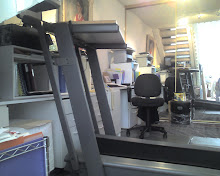
Walking to Work - Part Two - It's a DIY (Do-It-Yourself) Project

Since my friend and fellow technical writer, Menno Schoone, of the Netherlands asks, here's the specs on my walking desk:

- Used Healthrider treadmill $400 - most important feature is the arms which jut out at a 90 degree angle from the vertical upright posts. This is vital and was chosen to support the desktop portion.
- white melamine shelf, 16"x 32" wide, selected for its ideal size, originally from bookshelves unit. It has a smooth, finished surface.
- two 3' heavy duty black rubber bungee cords from Home Depot linked together to wrap around the treadmill arms to secure the shelf.
- a wireless keyboard and mouse.
- optional accessory - a thin, black surface pad, probably from Staples or Ikea, so that the keyboard and mouse don't slip off.

Walking Desk or Torture Device, You Decide
read more about the inspiration for this in the post of October 2008


Treadmill is tilt adjusted to the maximum incline and set to walk at 1 mile per hour. Typing and data input is not affected however precise mouse movements for graphic work requires keen hand-eye coordination. Walking and talking over the phone presents no challenges and the party on the other end doesn't even realize you are exercising. Use of a cordless headset or bluetooth is a given.

Unresolved problem: Monitor. My flat screen (19") is too small for this setting given it is positioned 37" away from my face. It's not easy to focus. So I need a 24" mounted with an articulating arm. These expenses will add maybe more than $800.

Close up of Healthrider with jerry rigged accessories

In the mean time, I'm not exactly walking to work everyday. Have laptop and comfortable chair, instead I will write to work.

FAST File and Settings Transfers - Does it work if you have a corrupted system?

FAST, File and Settings Transfers, is it really a wizard?

I'm perplexed. Why would a techie use the FAST tool to restore a legacy system which is running so poorly as to be suspect of either OS corruption or hopelessly infected?

As an example, take this laptop-centric client; she travels extensively and thus works exclusively from a laptop. This lovely creature, let's call her Dana, has much better things to with her time than be an expert with computers. Interestingly, during her travels, when she needed computer help to reformat or upgrade, no one had the brains or balls to denied this lovely lady her request to replicate the old system on a new laptop because she lacked original disks of her software applications.

The results: Her last two laptops have evidence of an unholy amalgamation by bringing over that which should have been left behind. Given her travels, logic follows that this would have to be the work of unrelated pseudo-techie characters seemingly with instinctual co-conspiratorial intent, to engineer this cyber-monstrosity which crawls slower than a centipede.

As luck would have it, she accidentally dropped the latest laptop on it's head and cracked the case. I"m thrilled she's got a new notebook for her birthday. Hopefully she's not feeling another year older, just wiser. My birthday wish for her is that she's no longer besieged by well meaning but still questionable technical assistance.

Most folks realize that it's important to have original software CDs or equivalent. My advise is to make sure you save your downloads or have the latest versions of your favorite applications somewhere.

Do not just copy the folder from your C:\Program Files – THIS WILL NOT WORK AND HAS NOT WORKED SINCE DOS DAYS!!! You must have the original setup files to correctly invoke the dynamic link libraries during application installation.

The moral of the story: Prepare for your evolutions. When you purchase applications, get a CD. Or if you buy online, download the application to a reliable location to a dedicated folder named Downloads, or My Downloads for archival purposes. Go one better and create a new folder for each application; label it with the software version. Other best practices, save the license key codes in a text file under the same folder. Always.

FAST has its purposes. Here's a bit more of information regarding FAST, Files and Settings Transfer Tool (XP/Vista/System7). This wizard can be configured to backup specific data. While it is usually reliable, it isn't foolproof if you are considering reformatting due to a damaged system.

You can find this wiz at Start Menu -> All Programs -> Accessories -> System Tools.


FAST is not suitable for user friendly back-up purposes. It compiles all of the data in a series of humongous files. Unless you want to extract all of the files and folders, use a file by file type of back-up. Because you wouldn't want to restore the whole computer just to retrieve a certain file. Best practice for either backup is to use a large storage media, either a CD or external hard drive. Better yet, step back and look at your system from a disaster recovery standpoint. My mantra: Redundancy in terms of media as well as location. Look for an online repository for your backups especially if you have mission critical data.

FAST is possible to use the wizard to transfer the settings and files from one user account to another. You can individually select either or both files and settings. However, in my experience, this isn't a quickie task for Windows.


Bottom line: Get an easy backup tool which gives you auto backup features. Set it; but don't forget it.

For further reading, here's a great source of information: Optimizing PC - Backup Data